
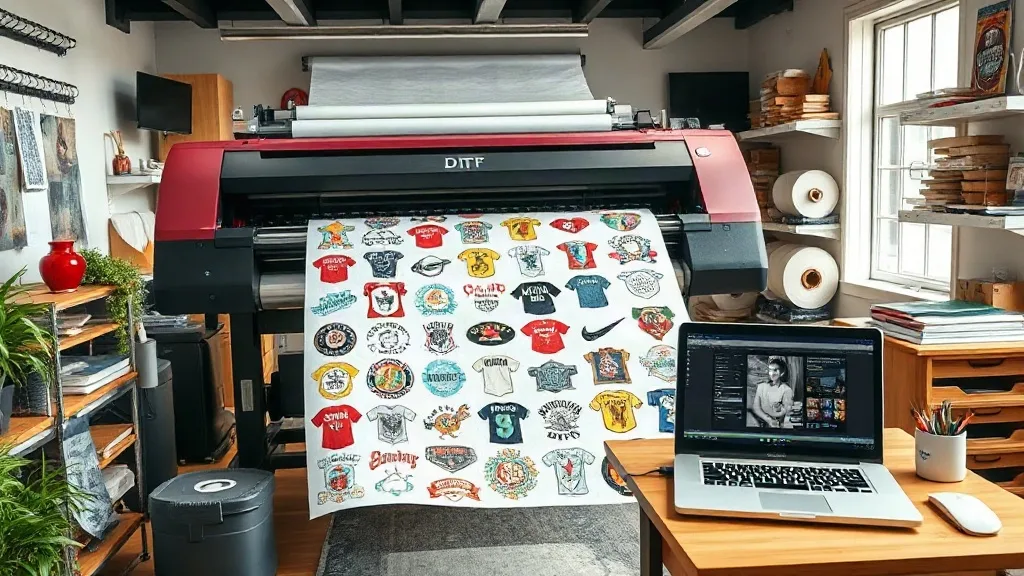
When it comes to custom apparel printing, efficiency and cost-effectiveness are paramount. Whether you're a small business owner, a print shop operator, or a DIY enthusiast, you've likely encountered the term DTF Gangsheet. But what exactly is a gangsheet, and why has it become a game-changer in the world of direct-to-film (DTF) printing? In this comprehensive guide, we'll explore everything you need to know about DTF gangsheets, from their benefits to practical tips for creating and ordering them. By the end, you'll be equipped with the knowledge to streamline your printing process and boost your bottom line.
What is a DTF Gangsheet?
A DTF Gangsheet is a single sheet of DTF transfer film that contains multiple designs arranged together, typically to maximize the use of space. Instead of printing each design individually, you gang up several designs onto one large sheet, hence the term 'gangsheet'. This method is widely used in the apparel decoration industry to save time, reduce material waste, and lower production costs. Gangsheets are especially beneficial for orders with multiple small designs or for creating a variety of products in one print run.
DTF printing itself involves printing your design onto a special film, applying a powder adhesive, and then transferring it onto fabric using a heat press. The gangsheet approach takes this a step further by allowing you to print numerous designs on a single film sheet, which can then be cut apart and applied individually.
Why Use a DTF Gangsheet?
There are several compelling reasons to incorporate DTF gangsheets into your printing workflow. Let's break down the key benefits.
Cost Savings
One of the most significant advantages of using a DTF Gangsheet is the cost savings. DTF printing requires consumables like film, ink, and powder. By printing multiple designs on one sheet, you minimize waste and make the most of your materials. Additionally, many DTF printing services offer gangsheet pricing that is more economical per design compared to ordering individual transfers. This is particularly advantageous for small businesses that need to keep overhead low.
Time Efficiency
Time is money, and gangsheets save both. Instead of loading the printer with multiple small jobs, you can print a single large sheet containing all your designs. This reduces setup time, printer downtime, and the number of print runs needed. For print shops handling high volumes, this efficiency can significantly increase throughput and allow you to take on more orders.
Consistency and Quality
When you print multiple designs on the same sheet, they all undergo the same printing conditions, leading to consistent color and quality across the board. This is crucial for brand consistency, especially if you're producing a line of products with similar designs. Moreover, DTF prints are known for their vibrant colors, fine details, and durability, and gangsheets ensure that each design meets the same high standards.
Versatility
Gangsheets are incredibly versatile. You can combine different designs, sizes, and even colors on a single sheet. Whether you need a batch of team jerseys with varying numbers, a mix of sizes for a family reunion, or a variety of logo placements, a gangsheet can accommodate all your needs in one go. This flexibility makes DTF gangsheets ideal for custom orders and limited-edition runs.
How to Create a DTF Gangsheet
Creating a gangsheet requires careful planning and the right tools. Here's a step-by-step guide to help you get started.
Step 1: Gather Your Designs
Collect all the designs you want to include on the gangsheet. Ensure they are high-resolution (300 DPI or higher) and in a compatible file format (PNG with transparent background is recommended). If you're working with vector files, convert them to high-quality raster images. Pay attention to the dimensions of each design; you'll need to know the exact width and height to arrange them efficiently.
Step 2: Choose the Right Sheet Size
DTF gangsheets come in various sizes, typically ranging from 12 inches wide to 60 inches wide, with lengths up to several feet. The size you choose depends on your printer's capabilities and the number of designs you need to print. For standard DTF printers, a 13x19 inch sheet is common, but larger formats like 22x36 inches or even 24x60 inches are available for industrial-scale production. Calculate the total area your designs will occupy and select a sheet size that minimizes leftover space.
Step 3: Arrange Designs Efficiently
Using design software like Adobe Illustrator, Photoshop, or specialized gangsheet builders, arrange your designs on the canvas. Aim to nestle designs closely together without overlapping, leaving a small gap (about 0.25 inches) between them for cutting. Rotate designs if necessary to fill gaps. Remember to include a margin around the edges (at least 0.5 inches) to prevent printing issues. Many online tools and templates can automate this process, saving you time and ensuring optimal layout.
Step 4: Prepare the File for Printing
Once your layout is set, flatten the image and ensure it's in the correct color mode (CMYK for printing). Add crop marks or registration marks if required by your printer. Save the file as a high-quality PDF or TIFF. If you're sending the gangsheet to a printing service, follow their specific file submission guidelines to avoid delays.
Step 5: Print and Transfer
If you're printing in-house, load the DTF film into your printer, ensuring the glossy side is facing the print head (refer to your printer manual). Print the gangsheet, then apply adhesive powder evenly over the wet ink. Shake off excess powder and cure the sheet under a heat source (e.g., a heat press or oven) until the powder melts and forms a smooth coating. The gangsheet is now ready to be cut into individual transfers and applied to garments using a heat press.
Tips for Ordering DTF Gangsheets Online
Many businesses opt to order gangsheets from professional DTF printing services to save on equipment costs and ensure quality. Here are some tips to make the most of your online order.
- Choose a reputable supplier: Look for services with positive reviews, clear pricing, and fast turnaround times. Check if they offer gangsheet calculators or templates to help you layout your designs.
- Understand pricing: Gangsheet pricing is often based on sheet size and quantity. Compare prices per square inch to find the best deal. Some suppliers offer discounts for bulk orders or repeat customers.
- Check file requirements: Each supplier has specific file specifications (resolution, color mode, bleed margins). Adhere to these to avoid additional fees or delays.
- Request a proof: Before committing to a large order, ask for a digital proof or a sample print to verify colors and quality.
- Plan for shipping: DTF transfers are delicate; ensure the supplier uses appropriate packaging and offers tracking. Consider turnaround time when planning your production schedule.
Common Mistakes to Avoid with DTF Gangsheets
Even experienced printers can run into issues with gangsheets. Here are some pitfalls to watch out for.
- Overcrowding: Placing designs too close together can make cutting difficult and increase the risk of damaging adjacent transfers. Always leave adequate spacing.
- Ignoring grain direction: DTF film has a grain, and printing against it can cause uneven ink absorption. Always load the film correctly.
- Inconsistent powder application: Too much or too little adhesive powder can lead to poor transfer quality. Use a powder shaker for even distribution and shake off excess thoroughly.
- Skipping a test print: Always do a small test print to check color accuracy and adhesion before committing to a full gangsheet.
- Using low-resolution images: Low-res images will look pixelated when printed. Always use high-resolution files (300 DPI minimum).
Frequently Asked Questions about DTF Gangsheets
What is the maximum size for a DTF gangsheet?
The maximum size depends on your printer and film availability. Common maximum widths are 13, 17, 22, and 24 inches, with lengths up to 60 inches or more for roll-fed printers. Some industrial printers can handle widths up to 60 inches. Always check your printer's specifications and the film manufacturer's recommendations.
Can I mix different designs and sizes on one gangsheet?
Absolutely. One of the main advantages of gangsheets is the ability to combine various designs, sizes, and even colors on a single sheet. Just ensure you arrange them efficiently and leave enough space for cutting.
How do I calculate the cost of a DTF gangsheet?
Cost is typically calculated based on the total area of the sheet (width x length) and the quantity ordered. Many suppliers have online calculators where you input dimensions and get an instant quote. Factor in additional costs like shipping and any design services if needed.
What file format is best for gangsheet designs?
PNG with a transparent background is ideal because it preserves transparency and is widely accepted. However, high-quality PDF or TIFF files are also suitable. Always follow your printer's or supplier's guidelines for file submission.
How long does a DTF gangsheet last?
When stored properly in a cool, dry place away from direct sunlight, DTF transfers can last up to 12 months. Once applied to fabric, the print can withstand numerous washes (typically 50+ if cared for properly) without fading or cracking.
Mastering the art of the DTF Gangsheet can revolutionize your custom apparel business. By understanding the benefits, following best practices for creation and ordering, and avoiding common mistakes, you'll be able to produce high-quality, vibrant prints efficiently and affordably. Whether you're a seasoned pro or just starting out, incorporating gangsheets into your workflow is a smart move that pays off in both time and money.